Developer Guide
Thank you for contributing to the development of java-tron source code!
Whether it is a minor bug fix or a major feature enhancement, we value your contributions.
On GitHub, you can:
- Track issues
- Contribute code
- Suggest improvements
- Request new features
- Collaborate on maintaining documentation
If you plan to contribute to java-tron development, please follow the process below.
Contribution Process Overview
- Fork the Repository Fork the java-tron repository to your personal account.
- Modify Code Create a new branch from the develop branch and begin implementation.
- Submit Changes Commit your changes with clear commit messages.
- Create a Pull Request (PR) Push your changes to your forked repository and submit a PR to the official repository.
- Code Review and Merge
Maintainers will review your PR based on the Code Review Guidelines and merge it into the
developbranch if it meets the requirements.
Submission Rules
- Minor Fixes You can directly submit a PR, but ensure it includes a complete description.
- Major Changes For complex architectural or logic changes, please first submit a TRON Improvement Proposal (TIP) in the TIP repository, detailing the motivation and implementation plan. Refer to the TIP Specification.
- Early PR Submission We encourage developers to submit PRs early, even if the feature is not yet complete. This notifies the community that development of the associated TIP has started.
- Development Branch
All development should be based on the
developbranch, followed by a PR submission.
Branch Management
The java-tron repository includes the following main branch types:
developBranch- Used for daily development
- Accepts merges exclusively from contributor forks and
release_*branches - When preparing a new release, a
release_*branch is created from this branch
masterBranch- Used only for releases
- Only merges from
release_*andhotfix/*branches
release_*Branch- Created from
developfor version finalization and regression testing - Merged into
masterbranch after regression testing - Retained permanently as a point-in-time release snapshot
- Bug fixes are merged directly into this branch and synchronized back to
develop
- Created from
feature/*Branch- Created from
developfor new feature development - Merged back into
developafter feature completion - Can be maintained long-term
- Created from
hotfix/*Branch- Created from
masterfor urgent bug fixes - Only accepts bug-fix pull requests from forked repositories
- Must be merged back into both
masteranddevelopto ensure consistency
- Created from
Code Submission Process
1. Fork and Clone the Repository
git clone https://github.com/yourname/java-tron.git
cd java-tron
git remote add upstream https://github.com/tronprotocol/java-tron.git
upstreamrefers to the official repository. The name can be customized, butupstreamis the conventional choice
2. Sync Upstream Code
git fetch upstream
git checkout develop
git merge upstream/develop --no-ff
The
--no-ffflag prevents fast-forward merges, preserving a clear record of the merge event in the commit history.
3. Create a Development Branch
git checkout -b feature/branch_name develop
4. Commit Changes
git add .
git commit -m "commit message"
5. Push the Branch
git push origin feature/branch_name
6. Create a Pull Request
From your own repository, submit a Pull Request (PR) to tronprotocol/java-tron.
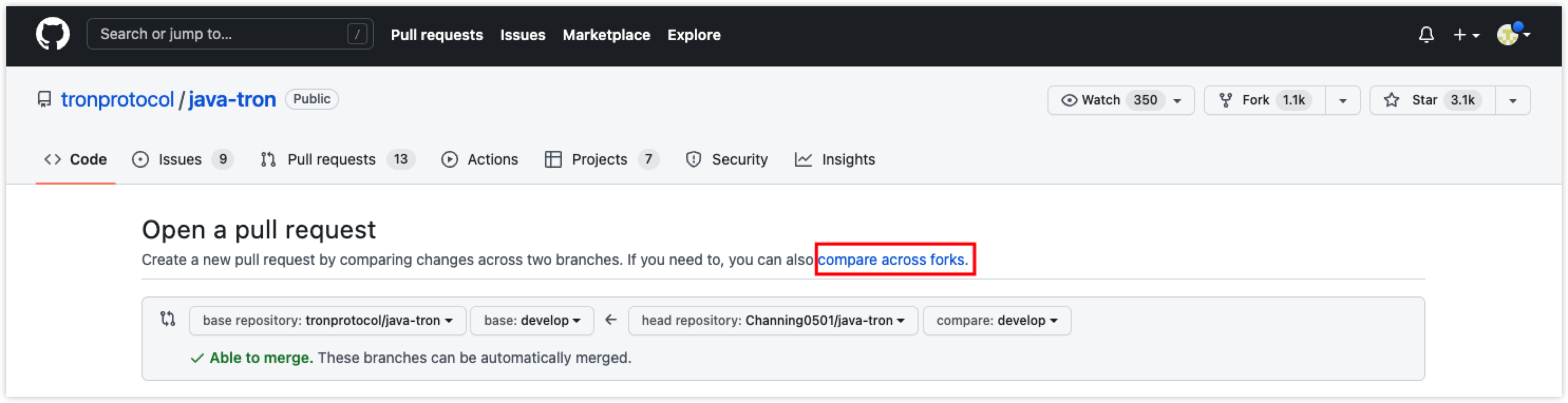 It’s recommended to select the options in the red box, setting
 develop branch of the tronprotocol/java-tron as the base branch and your forked repository’s branch as the compare branch.
Code Review Guidelines
The only way to merge code into java-tron is through a Pull Request (PR). All PRs must be reviewed before merging.
Review Process
- Reviewers are responsible for verifying the PR's objectives and technical impact.
- For PRs lacking descriptions or with excessive changes, reviewers may request additional clarification.
- Reviewers check code style, feature completeness, and test coverage.
- Reviewers should remain polite, respectful, and follow up promptly.
Feature Validation
- For Bug Fixes
- Reviewers must attempt to reproduce the reported issue to validate the effectiveness of the fix.
- It’s recommended that submitters provide unit tests that fail before the fix and pass after.
- New Feature PRs
- Reviewers should test the new feature and provide feedback.
- All new code must include unit tests.
Code Specification Requirements
- Adhere to automated code formatting standards before submission.
- Self-test before submission.
- Pass standardized tests.
Automated CI Checks
java-tron uses GitHub Actions for PR validation, code and configuration checks, multi-platform builds, coverage gates, integration and security tests, reviewer assignment, and cancellation of work for closed, unmerged PRs. Which workflows run depends on the changed files, event, and target branch.
See java-tron CI Workflows for the trigger matrix, check details, thresholds, and branch-specific behavior.
Once all checks pass, maintainers will review the PR and merge it into the appropriate target branch.
Coding Standards
- Follow the Google Java Style Guide
- Choose the target branch based on the type of change: regular PRs should target
develop; fixes for arelease_*branch should target the correspondingrelease_*branch; post-release emergency fixes should target the correspondinghotfix/*branch.
Branch Naming Conventions
masteranddevelopare fixed names.release_*: Named with therelease_prefix plus the version number, assigned by the project lead (e.g.,release_v4.8.0for theGreatVoyage-v4.8.0(Kant)release).hotfix/*: For urgent fixes, connecting words with underscores (e.g.,hotfix/typo,hotfix/null_point_exception).feature/*: For new feature development, connecting words with underscores (e.g.,feature/new_resource_model).
Pull Request Specifications
- One PR should address a single issue.
- Avoid excessively large changes.
- Format the title as
type: descriptionortype(scope): description. - Keep the title between 10 and 72 characters.
- Use one of these types:
feat,fix,refactor,docs,style,test,chore,ci,perf,build, orrevert. - Do not start the description portion of the title with an uppercase ASCII letter, and do not end the title with a period.
- Provide a PR description of at least 20 characters that explains what changed and why.
- Specify areas where feedback is needed.
The scope is optional. Unknown scopes only produce a warning, and reviewer assignment uses a separate scope mapping. See Scope Validation and Reviewer Assignment for details.
Commit Message Specifications
Recommended format:
<type>(<scope>): <subject>

<body>

<footer>
Commit Types
feat: New featurefix: Bug fixdocs: Documentation changesstyle: Formatting changes (no functional changes)refactor: Code refactoringtest: Test code changeschore: Build process or auxiliary tooling changes (no production code change)ci: CI/CD configuration changesperf: Performance improvementsbuild: Build system or dependency changesrevert: Reverts an earlier change
The scope specifies the place of the change, for example: protocol, api, test, vm, config, db, net. Use * if there isn't a more fitting scope.
Subject Specifications
- Keep the subject between 10 and 72 characters; do not end with a period.
- Start with a verb and use the first-person present tense (e.g., use
changeinstead ofchangedorchanges). - Do not start the subject with an uppercase letter.
- Avoid meaningless commits. It is recommended to use the
git rebasecommand.
Example:
feat(block): optimize the block-producing logic

1. increase the priority for acquiring synchronization lock
2. add interruption exception handling in block-producing thread

Closes #1234
Handling Special Cases
- Submitter Not Following Up
- Contact after a few days; if no response, the PR may be closed or continued by others.
- Submitter Refactoring While Fixing Bugs
- Small-scale refactoring is acceptable.
- Large-scale changes should be split into separate PRs or at least separate commits.
- Submitter Rejects Feedback
- Reviewers may close the PR.
Conduct
Please maintain respect and constructiveness to foster a positive community atmosphere.